
Chronic Care Management Setup in Patientree
How to run Medicare CCM programs in Patientree: enroll patients, build care plans, log staff time, and prepare billing for CPT 99490 and 99439.
In the Patientree app
/dashboard/chronic-disease/dashboard/chronic-disease/care-plans/dashboard/chronic-disease/monitoring/dashboard/chronic-disease/conditions
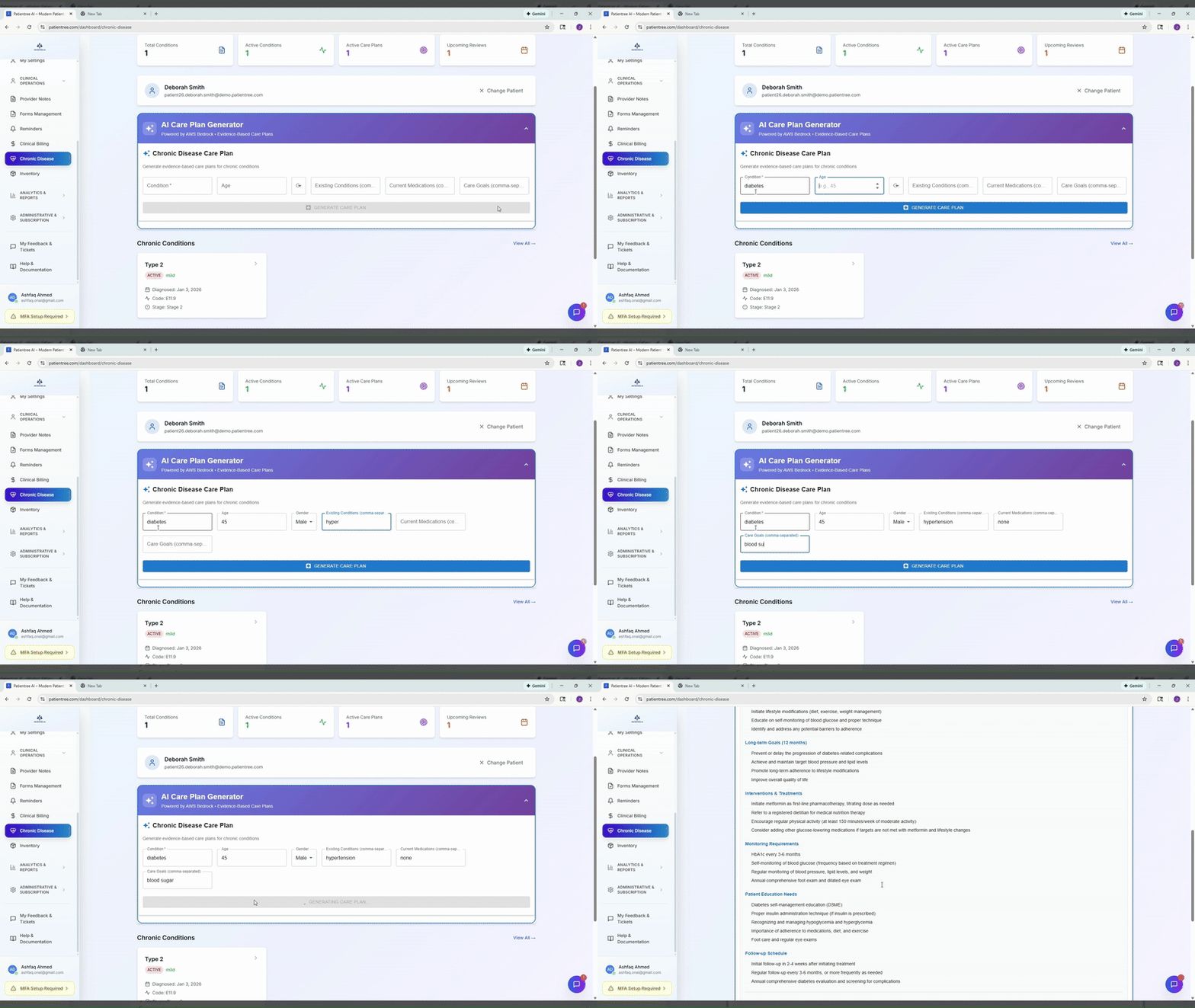
Patientree labels this workflow Chronic Disease Management in the app (the industry term is Chronic Care Management, or CCM). This guide walks through a compliant CCM program using the screens that exist today.
Who this is for
Primary care and specialty clinics billing Medicare CCM codes — especially teams with 1–5 providers who need time logging and care plan consistency without a separate CCM vendor.
Before you start
- Confirm Medicare eligibility rules for CCM (two or more chronic conditions, patient consent, 24/7 access, etc.).
- Name a clinical sponsor (MD/DO/NP/PA) and an operational owner (nurse or care coordinator).
- Estimate revenue with the CCM reimbursement calculator.
Step 1 — Open Chronic Disease Management
- Sign in to the staff dashboard.
- Go to Chronic Disease (
/dashboard/chronic-disease). - Confirm your clinic subscription includes chronic disease management (gated by plan).
You will see hubs for conditions, care plans, protocols, and monitoring.
Step 2 — Document patient conditions
- Select a patient from the chronic disease patient selector.
- Open Conditions (
/dashboard/chronic-disease/conditions). - Add or review each chronic diagnosis that qualifies for CCM.
- Open a condition detail page to track status, linked care plan, and notes.
Keep condition lists current — auditors compare CCM time to documented chronic problems.
Step 3 — Create a care plan
- Navigate to Care Plans (
/dashboard/chronic-disease/care-plans). - Create a new plan or open an existing one.
- Use care plan templates aligned to your protocols library (
/dashboard/chronic-disease/protocols). - Optional: use the AI care plan panel to draft goals, interventions, and follow-up tasks from clinical context. A licensed clinician must review and approve every plan.
The demo recording above shows AI-assisted care plan drafting — treat output as a draft, not a signed care plan.
Step 4 — Log CCM time contemporaneously
CCM billing depends on documented non-face-to-face minutes per calendar month.
| CPT code | Requirement (summary) |
|---|---|
| 99490 | First 20 minutes of clinical staff time per month |
| 99439 | Each additional 20 minutes (up to limits per CMS rules) |
Operational rules that stick:
- Log time when work happens (phone outreach, care coordination, medication reconciliation), not at month-end.
- Attribute time to a staff member who is allowed to perform CCM under your clinic policy.
- Tie logged activities to the active care plan.
Use monitoring views (/dashboard/chronic-disease/monitoring) to review trends that trigger outreach — that outreach time counts toward CCM when clinically appropriate.
Step 5 — Monthly close checklist
Before billing:
- Patient consent on file and enrollment documented.
- Care plan reviewed or updated this month.
- Total logged minutes meet code thresholds.
- Clinical sponsor attestation if your policy requires it.
- Export or summarize documentation for audit.
Common pitfalls
- Logging time in bulk at month-end — high audit risk.
- Care plans that never change — suggests checkbox compliance.
- No link between conditions and outreach — hard to defend medical necessity.
How Patientree helps
- Unified chronic disease hub instead of spreadsheets.
- AI drafts for care plans (clinician-reviewed).
- Monitoring charts to prioritize outreach.
- Pairs with CCM software positioning and the CCM calculator.
FAQ
Does Patientree automatically bill 99490?
Patientree supports workflows and documentation; your billing team or RCM process still submits claims. Always verify codes against current CMS guidance.
Is CCM the same as RPM?
No. CCM is care coordination time. RPM is device-based monitoring with different CPT codes — see our RPM workflow guide.