
SOAP Notes and AI Documentation in Patientree
Create structured SOAP notes in Patientree, use AI to draft and enhance documentation, and export clinical notes with coding suggestions.
In the Patientree app
/dashboard/provider-notes/dashboard/appointments
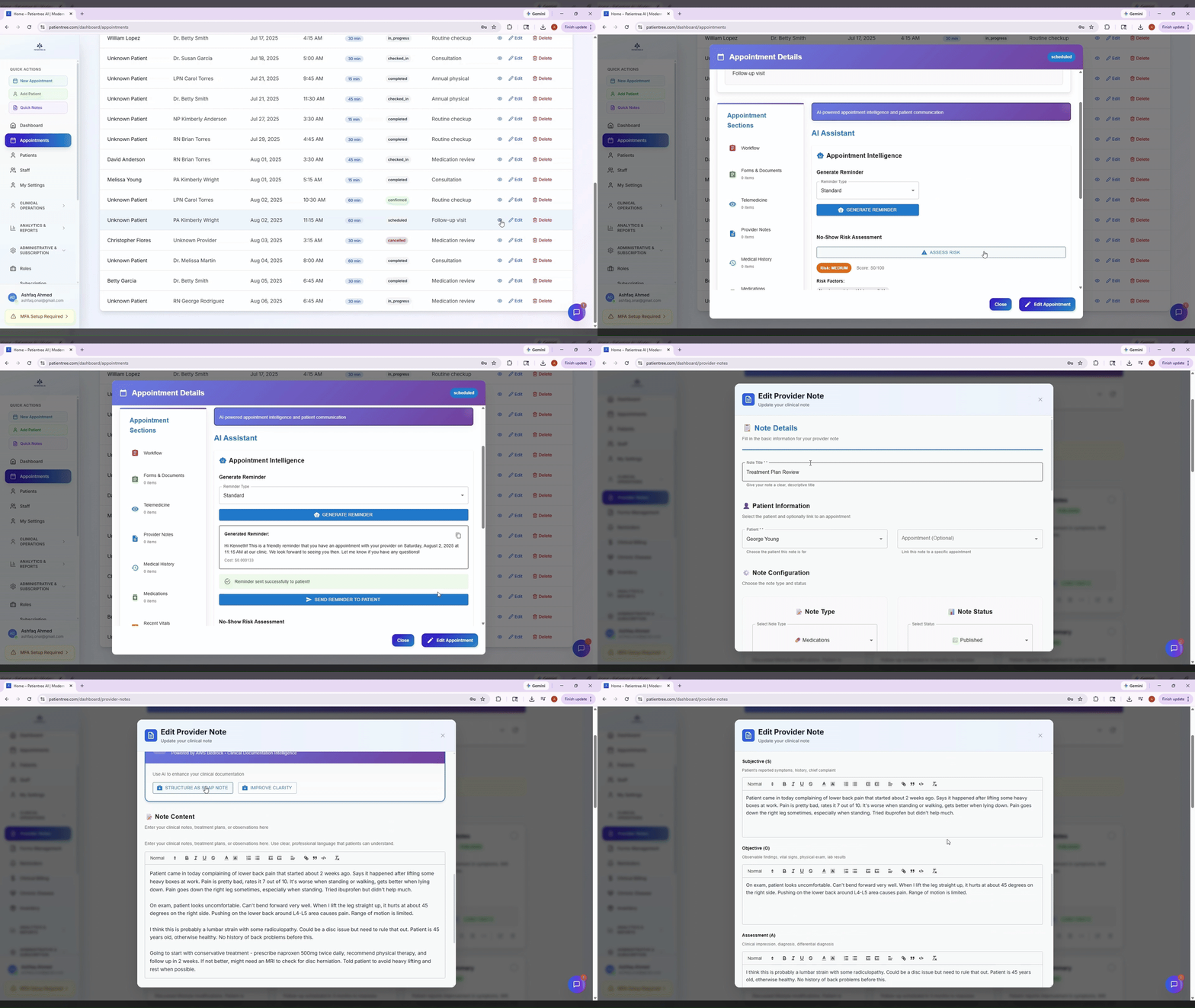
SOAP notes in Patientree live under Provider Notes, not a separate “SOAP” module. AI assistance is built into the note editor and appointment workflow.
SOAP structure in Patientree
When you create a note with type SOAP, the editor exposes four sections:
- Subjective — patient-reported symptoms and history
- Objective — exam findings, vitals, measurable data
- Assessment — clinical impression and problem list
- Plan — treatment, orders, follow-up
These map to structured soap_content fields in the provider note form.
Step 1 — Start from an appointment (recommended)
- Open Appointments (
/dashboard/appointments). - Open the appointment details modal for the visit.
- Complete vitals, medications, and history tabs as needed.
- Click Add provider note to open the note modal with patient context pre-loaded.
Starting from the appointment reduces re-typing and keeps the note tied to the encounter.
Step 2 — Or create a standalone note
- Go to Provider Notes (
/dashboard/provider-notes). - Create a new note and select SOAP as the note type.
- Apply a template if your clinic uses standardized formats (
ProviderNoteTemplateModal).
Step 3 — Use AI documentation assistance
From the note editor you can:
- Structure rough dictation or bullet points into SOAP sections.
- Enhance clarity and completeness while preserving clinical meaning.
- Suggest codes (ICD-10 / CPT) via the medical coding panel — clinician verifies all codes.
Clinical rule: AI output is a draft. The licensed provider must review, edit, and sign before the note is part of the medical record.
The demo GIF above shows the documentation assistant in action.
Step 4 — Publish, share, and export
- Publish the note when final.
- Share to the patient portal if appropriate (
/patient-dashboard/provider-notes). - Export PDF or FHIR-friendly formats where configured (see export settings in provider notes).
Documentation quality guardrails
- Use templates for high-volume visit types.
- Avoid copying forward entire prior notes without updating assessment/plan.
- Run periodic audits on unsigned notes and incomplete SOAP sections.
Related reading: Documentation quality: templates, prompts, guardrails.
FAQ
Does SOAP AI replace the provider?
No. It reduces formatting time; clinical judgment stays with the licensed clinician.
Can I use SOAP AI during telehealth?
Yes — create the note from the appointment modal with telemedicine enabled.